Introduction
Having powered anything from personal media players to enterprise servers, Redmond once again has a little something to call its own. It must wish it's bigger than the Xbox and sure hopes no one remembers the Kin phone.
The Microsoft Surface will have to be something special to be able to compete with both droids and iPads, as well as tablets made by Redmond's partner-OEMs. It's crunch time for Microsoft and nothing is off-limits in terms of tactics. Do as Apple does in tablets, and do as Google does in phones. Objective: put pressure on both, in both games.
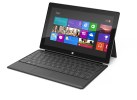
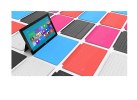
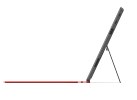
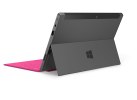
Microsoft Surface official photos
A smart keyboard dock lets the Surface double as a laptop - that will cost an extra 100, unless you get the 64GB version, which has it in the bundle.
Anyway, is it a glorified tablet, or a dumbed-down laptop? Join as we explore the Surface from its magnesium metal alloy (called VaporMg), to the quad-core Tegra 3 processor powering its Modern UI. But first, let's take a look at the Surface's main features and potential disadvantages:
Key features:
- 10.6" ClearType HD LCD touchscreen, 1366 x 768 pixels
- Dual-band Wi-Fi 802.11 a/b/g/n connectivity with Wi-Fi Direct
- Quad-core 1.3 GHz Cortex-A9 chipset
- 2 GB of RAM
- ULP GeForce GPU
- Windows 8 RT with SkyDrive support and activation
- Standard USB port, USB host
- 32/64GB of inbuilt storage
- Micro SDSX port, up to 64GB supported
- Bluetooth 4.0
- 31.5 Wh battery
- Accelerometer, compass and three-axis gyro-sensor
- Front and rear-facing 1.2MP auto-focus cameras
- 720p@30fps video for both cameras
- HD video out
- Weight of 680 grams (1.5 lb)
- VaporMg casing feels extra solid and pleasing to the touch
- Built-in kickstand
- Two kinds of keyboard dock/screen cover: Touch Cover is optional equipment in 32GB models, standard in 64GB; Type Cover sold separately
Main disadvantages:
- Windows RT works with Windows Store apps only
- Heavier than most 10-inch tablets
- Quite awkward to use in portrait
- Proprietary connector for charging
- Touch Cover build materials are extremely poor and the keyboard does not make for a good typing experience
What pushes the Surface further into the realm of tablets-and out of the realm of laptops-is its ARM-based Tegra 3 chipset. The same type of processor is ticking inside millions of smartphones and other handheld devices. Microsoft was forced to create an edition of Windows specifically designed to handle this type of architecture. Enter Windows RT.
Windows RT comes with some of the benefits of a full-featured Windows environment - a Desktop mode, which should look instantly familiar to Windows users, as well a version of Microsoft Office which matches its Windows 8 counterpart. If you're familiar with Windows 8, the redesigned Start interface shouldn't be groundbreaking either.
However, this can be misleading, as Windows RT is designed to run applications from the Windows Store only, and as such cannot run legacy x86 applications designed for full-featured versions of Windows. So, you won't be able to install any of the programs you typically use on a Windows desktop or laptop. Nevertheless, while its uses as a traditional Windows PC may be limited, that doesn't necessarily mean there's no room for it in the world of tablets.
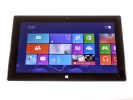
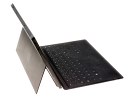
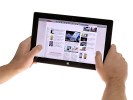
Microsoft Surface live photos
The Surface has its share of advantages over most other tablets, the Office package and seamless compatibility with your home or office PC being among the highlights. It has expandable storage (which not all tablets guarantee), and there's the keyboard dock/cover, too.
We'll cover all of that and more on the next page, where we'll take a look at the retail package, build quality, and design of the Microsoft Surface.
View the original article here
type="text/javascript">